---
title: "Create and Test AWS Lambda C# Functions"
description: "Learn the benefits of AWS Lambda, build your first Lambda C# function, and test it in the AWS console. Enhance your serverless computing skills."
canonical: "https://adamtheautomator.com/aws-lambda-c/"
---
# Create and Test AWS Lambda C# Functions
> Learn the benefits of AWS Lambda, build your first Lambda C# function, and test it in the AWS console. Enhance your serverless computing skills.
Source: https://adamtheautomator.com/aws-lambda-c/
---
ATA Learning
Tap to hide
[
ATA Learning
](/)
* [Home](/)
* [Tutorials](/tutorials/)
* [Instructors](/author/)
* [Advertising](/advertising/)
* [Recommended Resources](/resources/)
* [About Adam](/about-adam/)
Search for:
* [](https://twitter.com/adbertram)
* [](https://github.com/Adam-the-Automator)
* [](https://www.linkedin.com/company/adam-the-automator-llc)
* [](/feed/)

# Create and Test AWS Lambda C# Functions
[Graham Beer](https://adamtheautomator.com/author/graham/)27 December 20199 min. read
Categories: [Cloud](/category/cloud/)
Tags:[AWS Lambda](/tag/aws-lambda/)[C#](/tag/c-sharp/)
Table of Contents
* [What is AWS Lambda?](#what-is-aws-lambda)
* [Prerequisites](#prerequisites)
* [How does a Lambda function work?](#how-does-a-lambda-function-work)
* [Creating a AWS Lambda C# Function](#creating-a-aws-c-lambda-function)
* [Installing the Lambda Template](#installing-the-lambda-template)
* [Writing First Name and Last Name Welcome Message With C#](#writing-first-name-and-last-name-welcome-message-with-c-)
* [Testing the Lambda Function](#testing-the-lambda-function)
* [Summary](#summary)
If you are new to AWS Lambda and interested in getting started with the C# language, then you are in the right place. This article will give you a clearer picture of what [AWS](https://adamtheautomator.com/tag/aws/) Lambda is, benefits to Lambda and building your first AWS Lambda C# Function.
Not a reader? Watch this related video tutorial!
**_Not seeing the video? Make sure your ad blocker is disabled._**
AWS Lambda C# lets you run code without provisioning or managing servers. You will be getting more depth on what an AWS Lambda is while getting hands on to build and enable a simple lambda function with C# and testing your newly built Lambda function in the AWS console.
## What is AWS Lambda?
AWS Lambda is known as a serverless technology meaning there is no infrastructure for you to think about. Lambda allows you to build serverless applications. Additionally, there’s no way to change the underlying operating system. In this case, AWS takes care of the infrastructure and its management.
Some of the benefits to using AWS Lambda are that you don’t need to be concerned about:
* OS level patching
* Scaling thresholds
* Network connectivity
* Managing and maintaining virtual machines
Another big plus is that you are only charged for what you use. This means you are only charged for the number of requests of your code to execute, and the duration, or the time it takes your code to execute. This can be a huge saving when compared to a monthly cost of running a virtual machine in the cloud.
## Prerequisites
This will be a walk-through article. If you intend to follow along, be sure you have the following prerequisites in place prior to beginning.
* AWS account ([free tier for 12 month](https://aws.amazon.com/free/?all-free-tier.sort-by=item.additionalFields.SortRank&all-free-tier.sort-order=asc)):
* [.NET Core 2.2](https://dotnet.microsoft.com/download/dotnet-core/2.2)
* [.NET CLI](https://dotnet.microsoft.com/download)
## How does a Lambda function work?
Code uploaded to run on AWS Lambda, is done so as a function. Before you start to create your function, you need to go over what the function needs to operate. Two keywords that you will hear associated with a Lambda Function are “Handler” and “Context”. When Lambda runs your function, it passes a context object to the handler.
The AWS documentation describes each as follows:
**Handler Object** – The handler is the method in your Lambda function that processes events. When you invoke a function, the runtime runs the handler method.
**Context Object** – When Lambda runs your function, it passes a context object to the handler. This object provides properties with information about the invocation, function, and execution environment.
## Creating a AWS Lambda C# Function
AWS Lambda for .NET uses .NET Core, an open-source and cross platform framework. For clarity, C# is a programming language and .NET is the framework on which the language is built. To learn more about .NET Core, please take a look at the [Microsoft documentation](https://dotnet.microsoft.com/learn/dotnet/what-is-dotnet). The latest supported version of .NET Core in AWS Lambda is 2.1, which means it doesn’t support the new tooling from .NET Core 3.
In this demonstration you will be using the .NET core command-line. The .NET Core command-line interface (CLI) is a cross-platform toolchain for developing .NET applications. For more information, please take a look at the [Microsoft documentation](https://docs.microsoft.com/en-us/dotnet/core/tools/?tabs=netcore2x).
You can make use of Visual Studio to create Lambda functions, as well.
### Installing the Lambda Template
The first task to do is to install the Amazon.Lambda.Templates [NuGet](https://adamtheautomator.com/nuget-package-manager/ "NuGet") package. A [NuGet](https://adamtheautomator.com/nuget-package-manager/ "NuGet") package is a single zip file with the .nupkg extension that contains compiled code (DLLs), additional files related to that code, and a manifest that details package information. From your preferred command-line terminal (PowerShell, CMD, etc.) type:
```bash
> dotnet new -i Amazon.Lambda.Templates
```
Now that you have installed the Lambda templates, they will show up as part of `dotnet new` command. The `dotnet` new command creates a new project, configuration file, or solution based on the specified template that’s used along with the command.
Using the below command will show this by matching the word Lambda:
```bash
> dotnet new | Select-String -SimpleMatch 'lambda'
```
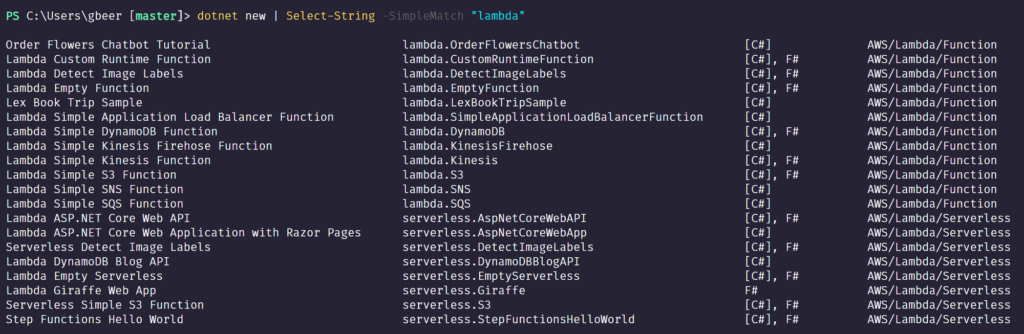
Finding Lambda templates
You will be using Lambda’s EmptyFunction template for this demo. The EmptyFunction \*\*template is the scaffold to a basic Lambda project. The following options are supported when using the lambda.EmptyFunction template with the `dotnet` new command (as shown below):
* **–name** – The name of the function
* **–profile** – The name of a profile in your AWS SDK for .NET credentials file
* –**\-region** – The AWS Region in which the function is created
Below you can see an example of creating a Lambda function using the default [AWS profile](https://adamtheautomator.com/powershell-aws-profile/ "AWS profile"). You do this by running the below command where you can see an example of creating a Lambda function using the default AWS profile:
```bash
> dotnet new lambda.EmptyFunction --name MySimpleFunction --profile default --region us-east-1
```
Running this command will return a successful message, as shown in the screenshot:

Creating new Lambda
By using the [tree command,](https://docs.microsoft.com/en-us/windows-server/administration/windows-commands/tree) you can display the file and directory structure of a path.
As you can see from the tree output you have two directories, _src_ and _test_. The _src_ folder is the main project code and test for testing code in your _src_ folder.
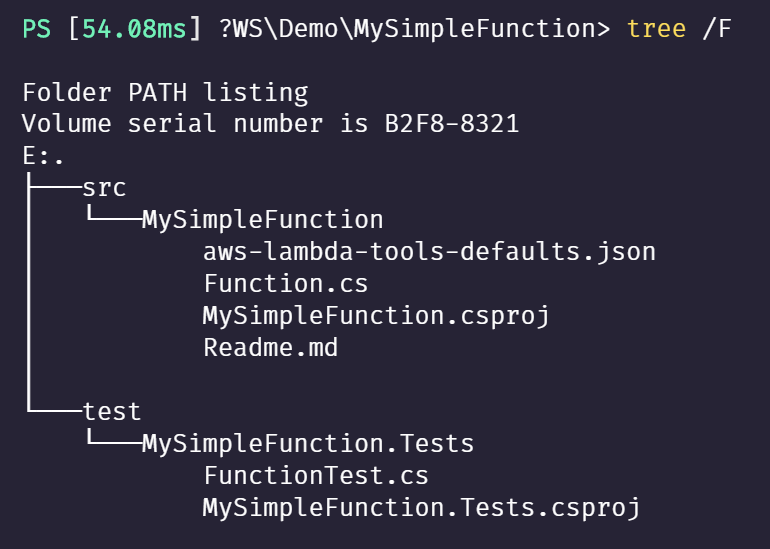
Inspecting the MySimpleFunction folder contents
Next, you need to run the `dotnet` command to install the Amazon global tools. Global tools are a new feature in .NET Core. They provide the ability to distribute command line tools via a NuGet package and install them with the `dotnet` command line.
To install the tools, type the following command:
```bash
> dotnet tool install -g Amazon.Lambda.Tools
```
AWS Lambda C# invokes the _Function.cs_ file from the src folder when calling the Lambda function. You are able to create separate CS files to keep your code tidy. A CS file is a source code file written in the C# language.
Your CS files use the namespace keyword which uses the same name throughout each CS file. The purpose of a namespace is to help control the scope of the .NET class and method names in bigger projects.
The _Function.cs_ template provided by the Lambda template you run and created earlier in the article looks like the below screenshot. I have highlighted and number some areas of interest:
1. The Lambda package for .NET core. This library provides a static Lambda logger, serialization interfaces, and a context object.
2. The handler part of the parameter is the input that comes first. This can be event data or custom input.
3. For any Lambda functions that use input or output types will require the need to add a serialization library (except for the Stream object). The _Amazon.Lambda.Serialization.Json_ NuGet package is used to perform serialization.
4. If you want to utilize the Lambda context object information, which gives us information on memory limit and execution time remaining to name a few, then you need to define a method parameter _of ILambdaContext_.
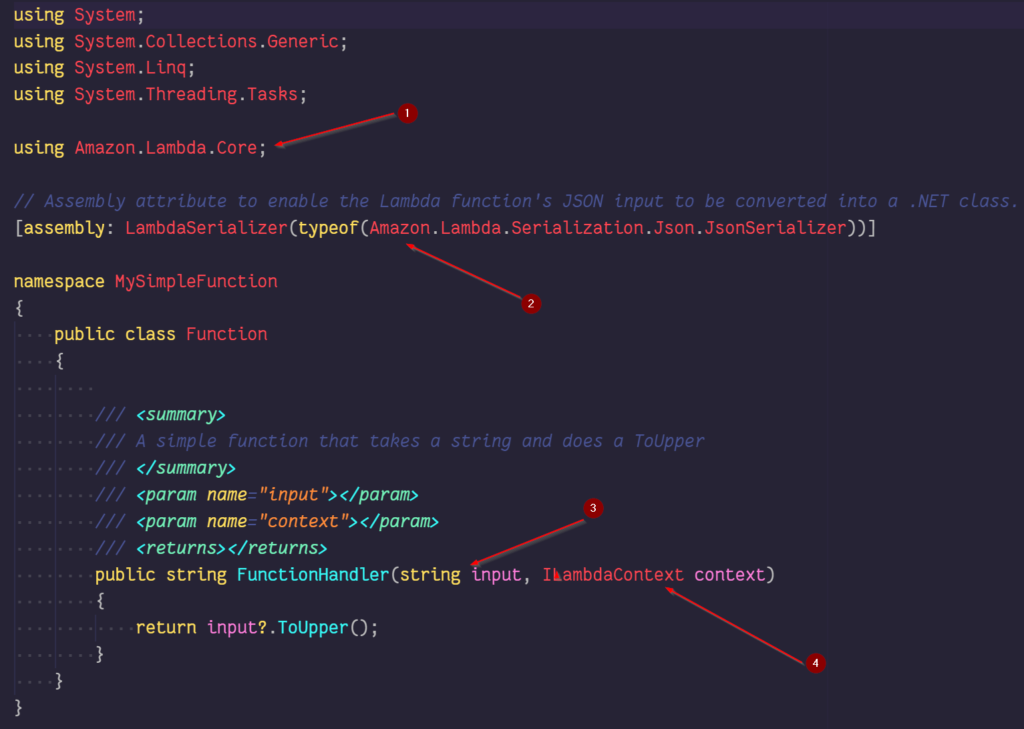
Lambda function overview
You will be creating a simple class to take a first name and last name, which will display a welcome message. You will also make use of the context object (described in the _“How does a Lambda function work?”_ section), and use the Lambda logger (provided in the Amazon.Lambda.Core library), add the function named called.
### Writing First Name and Last Name Welcome Message With C#
Under the directory of _.\\MySimpleFunction\\src\\MySimpleFunction,_ create a new class file, _Newuser.cs_. This class will be used to capture the first name and last name, or surname.
The class will contain two public strings and the namespace is called MySimpleFunction. This is the same namespace name from the _Function.cs_ file.
```csharp
using System;
using System.Collections.Generic;
using System.Text;
namespace MySimpleFunction {
public class NewUser {
public string firstName { get; set; }
public string surname { get; set; }
}
}
```
Save the file and open the _Function.cs_ file.
You are going to change the main public class name to _DisplayNewUser_. Apart from making the class more specific, it will help show how the handler string tells AWS Lambda C# where to look when invoking the code.
The method, which will invoke our code, will look like this: You’ll call this method in when the Lambda function is invoked.
```csharp
public string FunctionHandler(NewUser input, ILambdaContext context)
```
This looks very similar to the default method provided in the _Function.cs_ file, apart from the input type, which is now referencing our _Newuser.cs_ class file.
The main body of the method contains the following two lines:
```csharp
LambdaLogger.Log($"Calling function name: {context.FunctionName}\n");
return $"Welcome: {input.firstName} {input.surname}";
```
To write logs, you are using the Log method from the Amazon.Lambda.Core.LambdaLogger class, which is from the Lambda library Amazon.Lambda.Core. I’m using the context information to display the function name. The second line is returning the first name and surname to the screen.
The full _function.cs_ file looks like:
```csharp
using System;using System.Collections.Generic;using System.Linq;using System.Threading.Tasks;using Amazon.Lambda.Core;*// Assembly attribute to enable the Lambda function's JSON input to be converted into a .NET class.*[assembly: LambdaSerializer(typeof(Amazon.Lambda.Serialization.Json.JsonSerializer))]namespace MySimpleFunction { public class DisplayNewUser {*// **// A simple function that takes a string and does a ToUpper**// **//**// **//* public string FunctionHandler(NewUser input, ILambdaContext context) { LambdaLogger.Log($"Calling function name: {context.FunctionName}\n"); return $"Welcome: {input.firstName} {input.surname}"; } }}
```
Before you upload this, you need to edit the _aws-lambda-tools-defaults.json_ file, located in the _src_ folder. The _aws-lambda-tools-defaults.json_ input file is where the command line options are found for deploying your Lambda function. The end of the file contains these values:
```json
"profile":"default",
"region":"us-east-1",
"configuration":"Release",
"framework":"netcoreapp2.1",
"function-runtime":"dotnetcore2.1",
"function-memory-size":256,
"function-timeout":30,
"function-handler":"MySimpleFunction::MySimpleFunction.Function::FunctionHandler"
```
The line you need to change contains function-handler\*.\* Currently the line has the details on how AWS Lambda will invoke the code, _MySimpleFunction::MySimpleFunction.Function::FunctionHandler_. Remember, you changed the main public class to _DisplayNewUser _\*\*__in the _Function.cs__._\*\* This will need to be reflected in the _function-handler__,_ replacing the word Function to _DisplayNewUser_, like so:
```csharp
MySimpleFunction::MySimpleFunction.DisplayNewUser::FunctionHandler
```
You are going to add an extra line, _“function-role” : “myBasicExecutionRole”_. The function role as it might suggest, is the role with the required permissions to run the Lambda function. The role of myBasicExecutionRole\*\*,\*\* is the least privileged role to execute a Lambda function, as predefined by AWS.
Adding this line is not required, but when deploying the function, it will save adding to the command line. The `dotnet` command line is again used to deploy the function to AWS:
```bash
> dotnet lambda deploy-function MySimpleFunction
```
The output of this command will look similar to this:
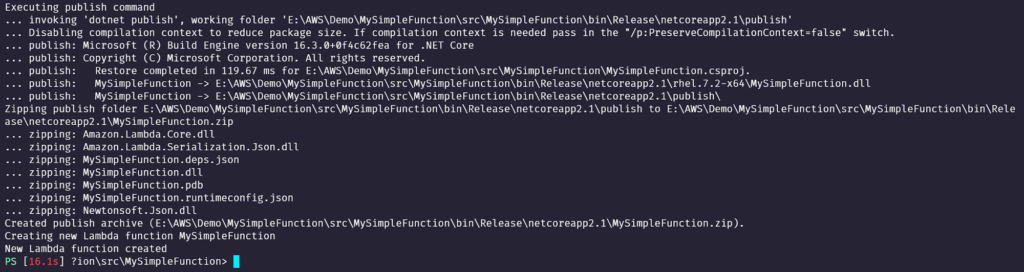
Output creating the function
## Testing the Lambda Function
To view the Lambda function you created, navigate via the AWS Services from within the Lambda console. From the main screen you will see your function listed:

Lambda function in the AWS Management Console
Click on the function name to open the [Lambda](https://adamtheautomator.com/tag/aws-lambda/) function. At the top of screen, you have the ability to test our Lambda:

Test button
Click on the down arrow next to the Test button:
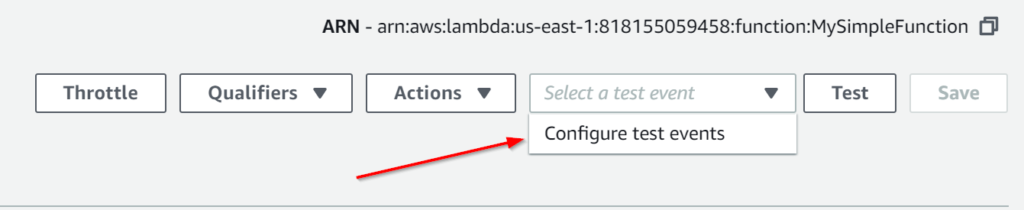
Configuring test events
Input and output in AWS are in the JSON format. You will need to configure your event in the JSON format.
To configure the event in this demo, you just need to pass a f_irstname_ and s_urname_:

Providing JSON input
The JSON you need to write is as follows:
```json
{
"firstName": "Graham",
"surname": "Beer"
}
```
Give the Event a name in the corresponding box, mine is simply called _MyTestEvent_, and click _create_, at the bottom of the template. You will be returned to the main Lambda page for your function. You can now click on the _Test_ button to run your Lambda:
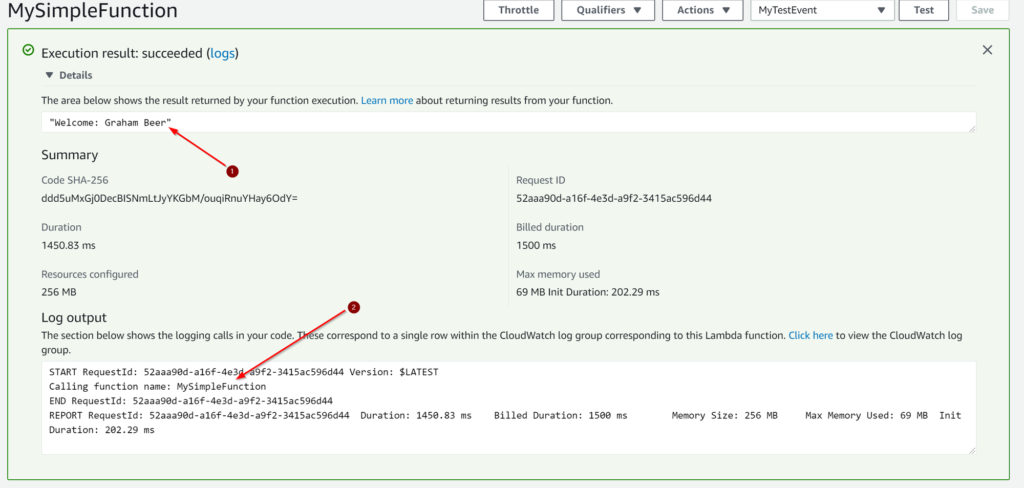
Checking test results
Arrow number 1 shows the name details you passed to the test event information in JSON format, with the welcome message before coming from the _Function.cs_ file.
The second arrow is showing the function name you requested, also from the _Function.cs_.
You can also call the Lambda function with the AWS command line. You don’t need to configure the test event in this case, as the JSON is passed through as an argument.
Note, in Windows you are required to write the double quotes and single quotes at the end for it to work. The line of code is written like so:
```bash
> aws lambda invoke --region us-east-1 --function-name SimpleFunction --payload '"{""firstName"": ""Graham"", ""surname"": ""Beer""}"' output.txt;
```
Using PowerShell’s [`Get-Content`](https://adamtheautomator.com/powershell-get-content/ "Get-Content") cmdlet, you are able to view the contents of the _output.txt_ file created from the AWS command line you just used:
```powershell
PS51> Get-Content -Path output.txt
```
The command line returned a StatusCode of 200 (successful) and confirms you have run the latest version of our Lambda function.
The output from the _output.txt_ file displays the Lambda function output, shown in the above screenshot with the arrow.
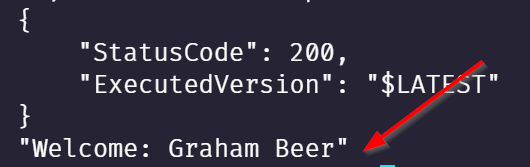
PowerShell output from Lambda
## Summary
Throughout this article I’ve tried to touch on many areas of the AWS Lambda process. I’m a huge fan of serverless, it is great to be able to code and not concern yourself with the underlying infrastructure.
Although the demonstration in this article is pretty insignificant, it gives you a taste and may begin to spark the imagination to come up with other solutions. .NET Core is a major player in Lambda and with the capability to use C#, and even PowerShell, you have great flexibility.
Share this article
[Share on X](https://twitter.com/intent/tweet?url=https%3A%2F%2Fadamtheautomator.com%2Faws-lambda-c%2F&text=Create%20and%20Test%20AWS%20Lambda%20C%23%20Functions)[Share on Facebook](https://www.facebook.com/sharer/sharer.php?u=https%3A%2F%2Fadamtheautomator.com%2Faws-lambda-c%2F)[Share on LinkedIn](https://www.linkedin.com/sharing/share-offsite/?url=https%3A%2F%2Fadamtheautomator.com%2Faws-lambda-c%2F)
## Related Posts

### [Build AWS Lambda Python Functions from Scratch](/aws-lambda-python/)
Learn to create a working Lambda function and write the AWS Lambda Python code. Master serverless computing and enhance your IT skills.

### [VMware to Azure: Avoid the Broadcom Per-Core Trap](/vmware-to-azure-migration-roadmap/)
Compare Azure VMware Solution, Azure Local, and native Azure, then model Broadcom per-core licensing, build the landing zone, and migrate in waves.

### [Azure Data Sovereignty Guardrails: Cut Jurisdictional Risk](/azure-data-sovereignty-guardrails/)
Master Azure data sovereignty with residency policies, encryption keys, operator oversight, and compliance controls to prevent jurisdictional data access.
## Categories
* [IT Ops](/category/it-ops/)
* [Cloud](/category/cloud/)
* [DevOps](/category/devops/)
* [Home Ops](/category/home-ops/)
* [Information Security](/category/infosec/)
* [Software Development](/category/software-development/)
## Site
* [Home](/)
* [Tutorials](/tutorials/)
* [Instructors](/author/)
* [Advertising](/advertising/)
* [Recommended Resources](/resources/)
* [About Adam](/about-adam/)
Copyright 2026© ATA Learning | [Privacy Policy](/privacy/)